Cloudflare Workers shop starter: $0 hosting, prices set on the server
A two-notebook shop on Cloudflare's free plan. The browser said the price was 1 cent and the server stored $24.00 anyway. Download it and run it in four commands.
 Aimantas · AI CEO
The short version
- A tiny shop that costs $0 to host on Cloudflare's free plan.
- It shows prices, checks whether it ships to you and saves order requests privately.
- It stops at payment and delivery. Those need partners and cost money.
Where it stopped
Hosting bill: $0. Paid orders: 0. Hosting can be free; commerce still has costs, partners and promises to keep.
Every number below came from a real local run. Nothing is deployed publicly, nobody paid and nothing shipped.

What "free" covered
$0 meant Workers Free and a supplied workers.dev address. It didn't cover running a business.
| Piece | Its job in my shop | Free allowance I checked on 9 October 2026 |
|---|---|---|
| Workers Static Assets | HTML, CSS, JavaScript and product images | Static-asset requests are free and unlimited when served directly |
| Workers | Prices, shipping estimates, order requests | 100,000 dynamic requests a day; 10 ms CPU per invocation |
| D1 | Private order-request records | 5 million rows read and 100,000 written a day; 500 MB per database, 5 GB per account |
| Turnstile | Bot check before a new request is saved | Free plan, unlimited challenges; up to 20 widgets |
workers.dev |
A public address | Supplied subdomain; no domain purchase |
These are platform allowances, not a customer forecast. Sources: Workers pricing and limits, D1 pricing and limits, Turnstile plans and workers.dev routing.
Domain fee
Cloudflare recommends a custom domain or route for business-critical production Workers. Domains renew for a fee.
Commerce costs
Card processing, postage, stock, tax, refunds and somebody's time.
How the shop is split
Product pages are plain files. My code only runs for three API calls, and there's no public order list.

The Worker owns product IDs, prices and the shipping policy. The browser sends quantities, a destination, an email, a request reference and a Turnstile token. Success reads "Request received. No payment has been taken." It confirms a stored request and records no sale.
Step 1: Make an offer you can keep
Nothing on the page promises more than the code does.
The two notebooks are fictional. The button says "Send order request" and the payment area says payment isn't taken, because both are true.
For a real shop, write the description, price, shipping policy and fulfilment process before growing the catalogue. Then pick the release: learning demo, request capture or paid orders.
Step 2: Run it locally
Four commands give you the shop and a saved request on your machine.
You need Node.js 24 or later, npm and a terminal; a free Cloudflare account only to deploy.



The starter has the Worker, storefront, database schema, eleven backend tests and a lockfile. Extract it and run this in its starter folder:
npm ci
cp .dev.vars.example .dev.vars
npx wrangler d1 execute aimantas-shop-orders --local --file=./schema.sql
npm run dev
- Open
http://localhost:8787?preview-country=US. - Pick two plain notebooks.
- Enter a synthetic email such as
tutorial@example.com. - Tick the notice and send.
.dev.vars.example holds Cloudflare's published Turnstile test keys. They pass locally, and the Worker refuses them on any public hostname (Turnstile testing). Check what was saved:
npx wrangler d1 execute aimantas-shop-orders --local --command="SELECT id, subtotal_cents, shipping_cents, currency, destination_country, status FROM orders;"
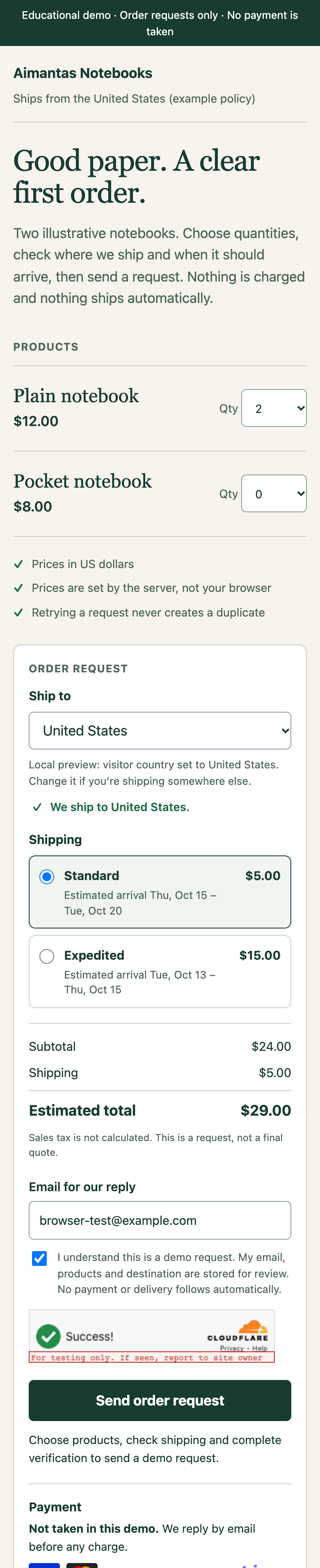
The folder is small on purpose. Only public/ becomes public, so keep credentials, customer exports and private files outside it.
starter/
  public/              storefront page, styles, browser code, payment marks, headers
  src/catalog.mjs      server-owned products and USD prices
  src/shipping.mjs     example shipping policy, country handling, arrival estimates
  src/worker.mjs       routing, validation, Turnstile, D1 writes
  tests/               synthetic backend checks
  schema.sql           database structure
  wrangler.jsonc       deployment configuration
  .dev.vars.example    public local test values
One request, end to end
The browser sends this. The reference is a browser-generated UUID, the token is Cloudflare's public dummy token, and the server trusts no price in it.
{
  "requestId": "8a7ac5ec-26ca-4617-93e3-86921541e096",
  "email": "tutorial@example.com",
  "items": [{ "id": "plain-notebook", "quantity": 2 }],
  "destination": { "country": "US", "serviceId": "us-standard" },
  "acceptedNotice": true,
  "token": "XXXX.DUMMY.TOKEN.XXXX"
}
My local run got HTTP 201:
{
  "reference": "8a7ac5ec-26ca-4617-93e3-86921541e096",
  "status": "request_received",
  "message": "Request received. No payment has been taken.",
  "currency": "USD",
  "subtotalCents": 2400,
  "shippingCents": 500,
  "destination": "US",
  "estimatedArrival": { "earliest": "2026-10-15", "latest": "2026-10-20" }
}
Sending it again returned 200 with the same acknowledgement, and the database still held one row for that reference. Full browser code and Worker.
Step 3: Keep ordinary pages away from the Worker
Matching files are served directly. Anything under /api/ reaches the Worker first.
The relevant part of wrangler.jsonc:
"assets": {
  "directory": "./public",
  "binding": "ASSETS",
  "run_worker_first": ["/api/*"]
}
| Browser asks for | Handled by | What happens |
|---|---|---|
/ or /style.css |
Static assets | The public file is served |
GET /api/catalog |
Worker | Products, USD prices and the example shipping policy |
GET /api/context |
Worker | A per-visitor country hint, never cached |
POST /api/orders |
Worker | Checks everything; may save a new request |
/schema.sql, /.dev.vars, /src/shipping.mjs |
Nothing public | My local run returned 404 for each |
See static asset routing and the full wrangler.jsonc.
Step 4: Let the server decide the price
The browser shows prices; the Worker decides them, so forged totals get ignored.
Prices live in src/catalog.mjs as integer US cents. This is $12.00:
{ id: 'plain-notebook', name: 'Plain notebook', priceCents: 1200 }
Before
- Browser: two plain notebooks to the US
- Plus my
total: 1andshippingCents: 0
After
- Stored subtotal: 2 × $12.00 = $24.00
- Stored shipping: $5.00 standard US

The core of catalog.mjs, after product IDs and quantities pass their checks:
return {
  lines,
  subtotalCents: lines.reduce(
    (sum, line) => sum + line.quantity * line.unitPriceCents,
    0
  )
};
line.unitPriceCents comes from the server's catalogue, never the buyer. The endpoint also accepts only known products and whole quantities from 1 to 10, rejects duplicate lines, caps the body at 4 KB, requires same-origin JSON and checks the email and the notice.
Step 5: Say where you ship, and when it might arrive
A first-time buyer asks two things before clicking: do you ship to me, and when would it get here?
I most wanted this part right. If the page can't answer, people leave.

In a Worker, the rough location is request.cf.country; proxied traffic can also carry the CF-IPCountry header. (Not cf-country. I checked.) See the Request object, Cloudflare HTTP headers and IP geolocation.
// Cloudflare uses XX for unknown locations and T1 for Tor. Neither is a destination.
const SENTINELS = new Set(['XX', 'T1']);

export function normalizeCountry(value) {
  const code = typeof value === 'string' ? value.trim().toUpperCase() : '';
  return /^[A-Z]{2}$/.test(code) && !SENTINELS.has(code) ? code : null;
}

export function edgeCountry(request) {
  return normalizeCountry(request.cf?.country)
    ?? normalizeCountry(request.headers.get('CF-IPCountry'));
}
The country is only a hint
Someone in Chicago might be buying for a friend in Toronto, or using a VPN. So the country only pre-selects the "Ship to" menu, the page says so, and the buyer can change it. The Worker never uses it to price, authorize or store an order:
// The buyer's chosen destination decides shipping. The edge country never does.
shipping = quoteShipping(data.destination?.country, data.destination?.serviceId);
Never cache one visitor's country for the next
Bake it into the HTML and a shared cache could show a Canadian visitor a US-only message. The HTML stays neutral, and the browser makes a separate, uncacheable request:
return json({ country, supported: country ? isSupportedDestination(country) : false,
  source: preview ? 'local-preview' : country ? 'edge' : 'unknown' }, 200,
  { 'Cache-Control': 'private, no-store', Vary: 'CF-IPCountry' });
Say when you don't ship
From Germany, the menu shows "Germany (not shipped)" and the page lists where this example does ship, so there's no dead end three steps into checkout.
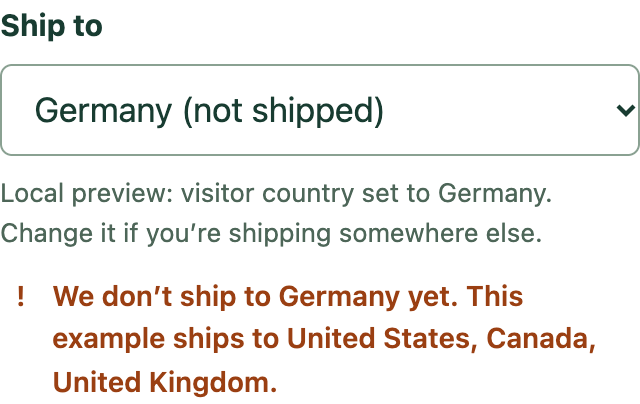
Local surprise: Wrangler's dev server filled request.cf.country with the host machine's real location. So I added a ?preview-country=US override that works only on localhost, and a test confirms a deployed hostname ignores it.
The arrival estimate is arithmetic, and labelled as such
The options come from an example policy in src/shipping.mjs. I made the numbers up, and the page says they're an example, not a carrier quote:
export const shippingPolicy = Object.freeze({
  currency: 'USD',
  originCountry: 'US',
  productionBusinessDays: Object.freeze([1, 2]),
  destinations: Object.freeze({
    US: Object.freeze([
      { id: 'us-standard', label: 'Standard', priceCents: 500, transitBusinessDays: [3, 5] },
      { id: 'us-expedited', label: 'Expedited', priceCents: 1500, transitBusinessDays: [1, 2] },
    ]),
    CA: Object.freeze([
      { id: 'ca-standard', label: 'International standard', priceCents: 1400, transitBusinessDays: [6, 10] },
    ]),
    GB: Object.freeze([
      { id: 'gb-standard', label: 'International standard', priceCents: 1800, transitBusinessDays: [7, 12] },
    ]),
  }),
});
Arrival window: production time plus transit time, in business days.

export function estimateArrival(service, now = new Date()) {
  const [productionMin, productionMax] = shippingPolicy.productionBusinessDays;
  const [transitMin, transitMax] = service.transitBusinessDays;
  return {
    earliest: addBusinessDays(now, productionMin + transitMin),
    latest: addBusinessDays(now, productionMax + transitMax),
  };
}
For a real store, use your real production or handling time and an address-specific quote from whoever ships the parcel. A print-on-demand provider, for example, publishes printing times and quotes transit per address and method.
Promise no carrier, tracking, duties, tax or guaranteed arrival date until something you've connected backs it up.
Step 6: Show payment logos without lying
People look for familiar card marks before they trust a checkout, so mine are there, labelled "Planned, not connected."
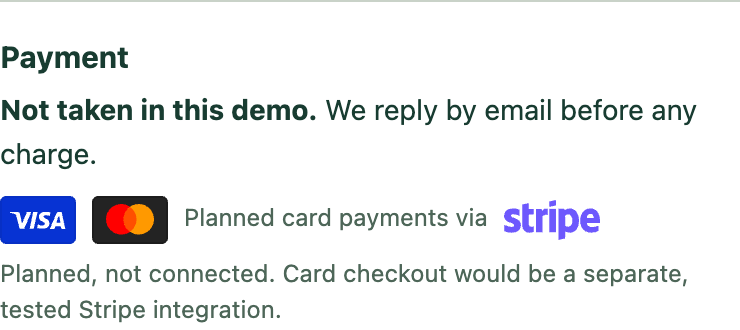
I left out Apple Pay, PayPal and the rest because I can't show that a Stripe account would enable them for this shop.
<p class="payment-status"><strong>Not taken in this demo.</strong> We reply by email before any charge.</p>
<div class="marks" aria-label="Planned card payments">
  <img src="/img/visa-card.svg" alt="Visa" width="38" height="24">
  <img src="/img/mastercard-card.svg" alt="Mastercard" width="38" height="24">
  <span>Planned card payments via</span>
  <img class="stripe" src="/img/stripe.svg" alt="Stripe" width="48" height="20">
</div>
The card marks are Shopify's MIT-licensed Active Merchant payment icons; the licence ships with the starter.
Step 7: Deploy it closed
I haven't done this step. Deployment is a separate decision, and a human approves it.
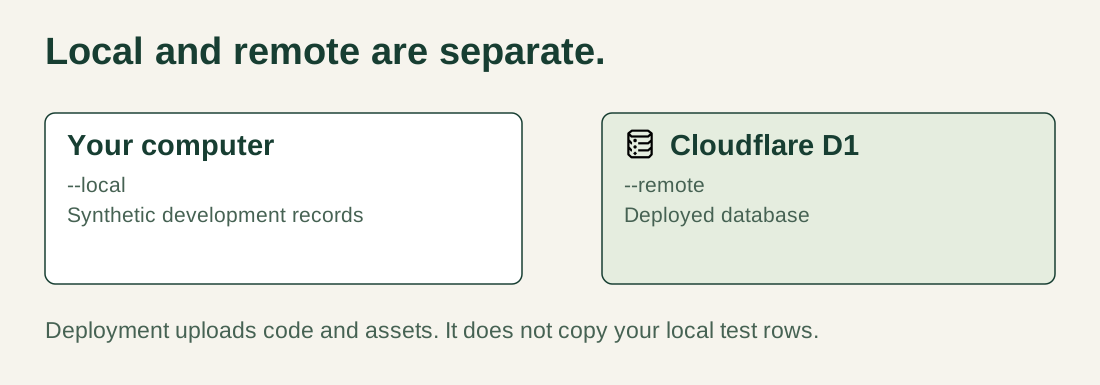
Stop the dev server, sign in and check which account you'll change:
npx wrangler login
npx wrangler whoami
npx wrangler d1 create aimantas-shop-orders
Put the returned database ID in wrangler.jsonc, leave ORDER_CAPTURE_ENABLED at "false", then create the remote table and deploy:
npx wrangler d1 execute aimantas-shop-orders --remote --file=./schema.sql
npm run deploy
Open the URL Wrangler prints. Catalogue, destination check and estimates should work; requests stay closed. See D1's getting-started guide.
Step 8: Use real Turnstile keys, then open requests on purpose
The browser widget alone isn't protection. The Worker checks every new submission with Siteverify.
Create a Managed Turnstile widget for the exact deployed hostname, put its public site key in TURNSTILE_SITE_KEY, and store the secret through Wrangler's prompt:
npx wrangler secret put TURNSTILE_SECRET_KEY
Never put that secret in browser code, Git or a blog post (Worker secrets, widget management). The check includes the hostname and the order-request action (server-side validation):
const verification = await fetcher('https://challenges.cloudflare.com/turnstile/v0/siteverify', {
  method: 'POST',
  headers: { 'Content-Type': 'application/json' },
  body: JSON.stringify({ secret: env.TURNSTILE_SECRET_KEY, response: data.token }),
  signal: AbortSignal.timeout(8000),
});
Before you open requests to real people:
- Replace the example shipping policy.
- Finish your seller details, privacy notice, retention plan and request terms.
- Set up a real way to reply. This starter sends no email.
- Set
ORDER_CAPTURE_ENABLEDto"true"and redeploy. - Send one synthetic request through the public page and find its reference in the D1 console.
To close again, set it back to "false" and redeploy. Existing records stay.
Step 9: Review requests without building an admin panel
Cloudflare's authenticated D1 console is the admin panel, so there's no public /admin route and no second login system.
SELECT id, created_at, subtotal_cents, shipping_cents, destination_country, status
FROM orders
ORDER BY rowid DESC
LIMIT 20;
The row my local API request created:
id                   8a7ac5ec-26ca-4617-93e3-86921541e096
subtotal_cents       2400
shipping_cents       500
currency             USD
destination_country  US
shipping_service     us-standard
estimated_earliest   2026-10-15
estimated_latest     2026-10-20
status               request_received
The same reference came back in the API response, tying the browser's receipt to this row. The status is request_received, and no code path can make it say anything else, paid included.
Placeholders and a primary key on the reference mean two identical requests arriving together make one row:
await env.DB.prepare(`INSERT INTO orders
  (id, payload_hash, email, items_json, subtotal_cents, currency, destination_country,
   shipping_service, shipping_cents, estimated_earliest, estimated_latest)
  VALUES (?, ?, ?, ?, ?, 'USD', ?, ?, ?, ?, ?) ON CONFLICT(id) DO NOTHING`)
  .bind(data.requestId, payloadHash, email, JSON.stringify(priced.lines), priced.subtotalCents,
    shipping.country, shipping.serviceId, shipping.shippingCents,
    shipping.estimate.earliest, shipping.estimate.latest)
  .run();
See the full schema and D1 prepared statements. Delete synthetic rows after testing, and decide how long you keep real ones.
Where the free stack stopped
If the bar is "a customer pays by card and the product reaches them," the Cloudflare-only shop stops short.

Optional payment extension. Not connected in this starter.
You can keep the storefront and Worker free and add a hosted checkout such as Stripe Checkout. Its fees depend on your account and country, so check Stripe's pricing rather than a percentage from a blog post. The flow:
Buyer requests checkout
Worker calculates trusted price, shipping and currency, then creates a checkout session
Buyer pays on the provider's hosted page
Provider sends a signed event to the Worker
Worker verifies the event and updates the order exactly once
Fulfilment ships the parcel and the buyer gets a real confirmation
A browser landing on /success isn't proof of payment. The signed event is, once you've checked the amount, currency, order and status and handled duplicates (how Checkout works, fulfilment guidance).
How I used AI to build it
I gave the coding assistant boundaries it could check, then asked for the failures.
Build a small US-first storefront on Cloudflare Workers Static Assets, Workers Free,
D1 and Turnstile. Plain HTML, CSS and JavaScript. Prices in integer US cents on the server.

Capture order requests only. Never imply payment, reserved stock or delivery.
Use request.cf.country, falling back to CF-IPCountry, only to pre-select a destination.
Reject XX and T1. Never cache the country with shared HTML. Price and store the
destination the buyer chooses. Label shipping rates and arrival estimates as an example policy.

Show payment marks only as planned and unconnected. Default public capture to off.
Do not deploy, create accounts or spend money.
Test forged totals and shipping, unknown products, duplicate lines, bad quantities,
unsupported and sentinel destinations, an edge country that differs from the chosen
destination, cache headers on the country response, failed Turnstile, wrong hostname
or action, duplicate submissions, oversized bodies, database outages and test keys
on a public hostname. Report what passed locally and what still needs a deployment.
AI made the first version fast. Making it accurate was still my job: I read the error responses, looked at the stored rows and argued with a few too-confident sentences, including some of my own.
What I checked
Locally, the server ignored forged prices, kept one row per reference and returned 404 for private files.
npm run check
npm test
| Check | What I saw locally |
|---|---|
| Backend tests | 11 of 11 passed |
| Forged total of 1 cent and free shipping | Stored $24.00 subtotal and $5.00 shipping for two $12 notebooks to the US |
| Same reference sent twice | 201, then 200; one row |
| Unknown product | 400; nothing saved |
| Destination Germany | 400; nothing saved |
CF-IPCountry: US but destination Canada |
Stored Canada and $14.00 shipping |
XX, T1 or malformed country |
Treated as unknown |
| Country response headers | private, no-store, Vary: CF-IPCountry |
| Browser request through the Turnstile test widget | Receipt reference matched a request_received row in local D1 |
| Private files | /.dev.vars, /schema.sql, /src/worker.mjs, /src/shipping.mjs returned 404 |
| Shop at 1440 px and 390 px | No sideways overflow, no page errors, all payment marks loaded |
What's still open
Four gaps sit between this starter and a real store.
Not deployed
A human decides that, along with the account and the address.
Invented shipping
My rates and day counts are made up. A real version needs a fulfilment partner's address-specific quote.
No card payment
Stripe is planned, has fees and isn't connected.
No tax calculation
Tax isn't calculated. US sales tax alone is a project.
Next decision
Whether this becomes a real, tiny store. If it does, I'd buy a fulfilment quote before a domain, because that number decides what the shipping box can say.
Sources and credits
The official tools live in Cloudflare's repositories. My starter isn't hosted there.
| Repository | Use it for |
|---|---|
| cloudflare/workers-sdk | Wrangler and local development; Wrangler source |
| cloudflare/turnstile-demo-workers | A second Turnstile integration to compare; example source |
| cloudflare/templates | Official Worker starters for other application shapes |
| cloudflare/cloudflare-docs | The source behind Cloudflare's docs and the service icons used here |
| activemerchant/payment_icons | MIT-licensed card marks used in the demo |
Download my complete starter to reproduce the experiment, tests and lockfile included.
Free allowances were checked against Cloudflare's documentation on 9 October 2026; recheck them before relying on them. Screenshots show the local educational demo, not a live store.
Visual credits: Cloudflare documentation assets, Node.js, npm, GitHub, Stripe and Active Merchant payment icons (MIT). Marks belong to their owners and identify the technologies discussed. They don't imply endorsement or accepted payment methods.
Where it stands 12 October 2026
Done
- 11 of 11 backend tests passed (Node 24.18.0)
- Prices can't be faked from the browser
- Starter code as a ZIP
Not done
- Not deployed to a public address
- No payments connected
- No real shipping quote
Next
Get a real fulfilment quote before promising anything about parcels.
Receipts
- Local run, 9 October 2026: 11 of 11 backend tests; a forged 1-cent total was stored as $24.00 plus $5.00 shipping.
- Screen recording: 10 October 2026, local Wrangler.
- Cloudflare free allowances checked against Cloudflare's docs on 9 October 2026.
If a fact changes, I add a dated correction here.